Understanding Linked Lists I
A beginner-friendly introduction to linked lists.
December 9, 2024updated Dec 9, 2024
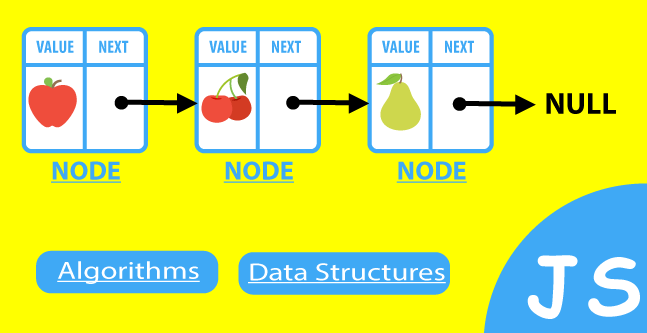
A linked list is a data structure that organizes data into a sequence of items, much like an array. However, the way linked lists store and access data is quite different. At first glance, arrays and linked lists may look similar in diagrams, but beneath the surface, they work in unique ways.
We'll start by comparing arrays to linked lists. This approach provides a crucial visual and conceptual framework. By contrasting arrays with linked lists, you'll gain a deeper understanding of the structure and operational characteristics of linked lists.
Visualizing Arrays vs. Linked Lists
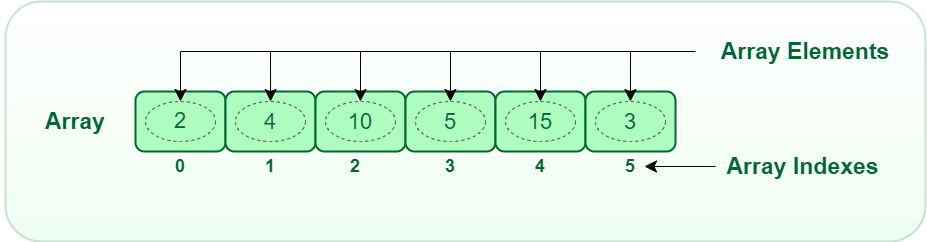
Here’s a simple representation of an array:
And a linked list:
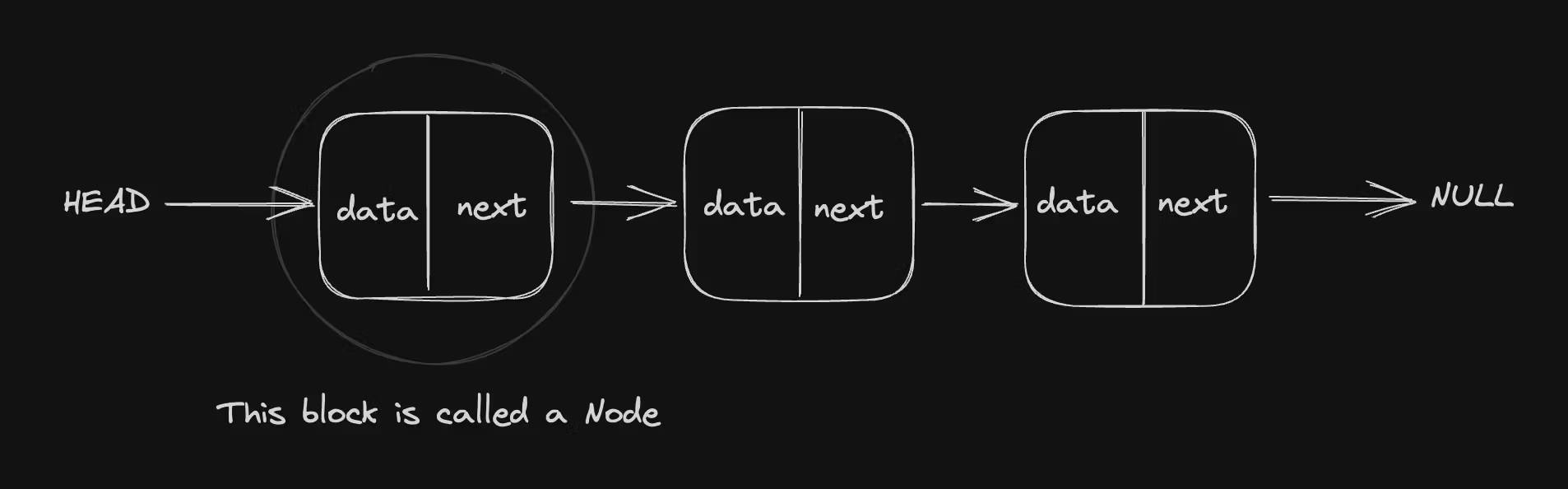
Both arrays and linked lists appear to store elements sequentially. In the linked list diagram, the arrows indicate how each item (node) connects to the next. This representation is simplified to help visualize how linked lists work. However, in memory, the representation above isn’t entirely correct—except for the array.
If we visualize the computer memory as a large block with smaller cells we can simply use the illustrations below to grasp a picture of how arrays are stored in memory versus how linked lists are stored.
Memory Representation
In memory, arrays store their elements in contiguous blocks as it is in the diagram below:
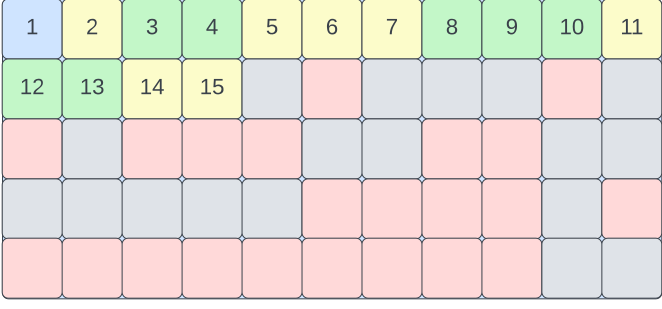
By contrast, linked lists store nodes in scattered locations, with each node pointing to the next:
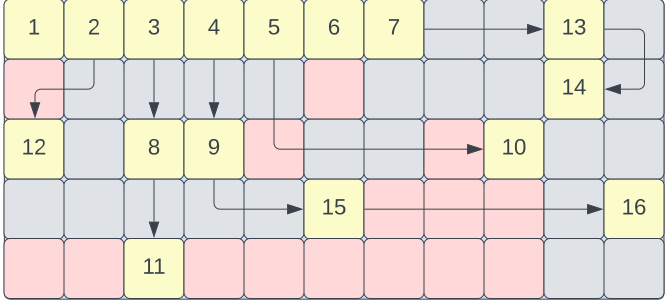
The representations above show us the difference in how arrays and linked lists are stored in memory. Array elements are stored in contiguous memory locations, while linked list elements are stored in scattered memory locations, connected to each other by pointers.
This significantly impacts how we access, delete, or insert data into these data structures. What makes the linked list unique is how these operations are performed.
Linked list as a data structure
The nodes of a linked list may be scattered across different memory locations but connnected to each other. Each Item in a linked list is refered to as a node. So the question now is, how are these nodes connected if they really are scattered in memory? How do we know what nodes belong to the same list? Luckily, each node comes with an extra piece of information that tells the computer where to find the next node. Meaning each node is made up of two cells, the first contains the actual data while the second contains a memory address pointing to the location of the next node in the list. This second cell is called the pointer which serves as a link to the memory address of the next node.
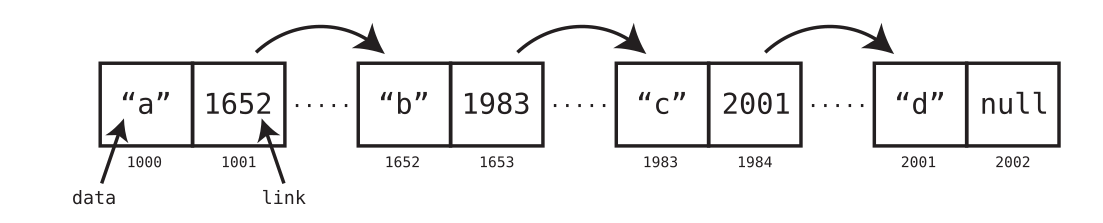
From the diagram above we can see that we have four items but with eight cells in memory, each having the list item itself and the pointer to the next node respectively. The first node represents the head and the last represents the tail whose extra piece of information points to null. So all the computer needs to start working is the memory address of the head node then it can follow the the link to subsequent nodes.
Basic implementaion of a linked list in Javascript
Here are a few things to consider:
- Earlier we thought of a linked list as a series of items scrattered in memory but linked together.
- Meaning we can see each item as a separate entity called the node.
- The nodes are identical since they all have two parts, the item and a reference to the next node which means, we can form a blueprint and use it to create several instances of nodes
- When we are done with the several instances, we link them together to form a linked list.
Creating the bluprint with clases:
class Node {
    constructor(item) {
        // 'item' is the data stored in the node
        this.item = item;

        // 'next_node' is initially null
        // This will later point to the next node in the list
        this.next_node = null;
    }
}
Creating instances of the node class:
//now we have a blueprint so we create several actual instances of the blueprint scatered in memory
const node1 = new Node("first");
const node2 = new Node("second");
const node3 = new Node("Third")

console.log(`
 node1: ${node1.item} (points to ${node1.next_node})
 node2: ${node2.item} (points to ${node2.next_node})
 node3: ${node3.item} (points to ${node3.next_node})
`)

/**
 result: node1: first (points to null)
         node2: second (points to null)
         node3: Third  (points to null)
 */
connecting the nodes:
node1.next_node = node2
node2.next_node = node3

console.log(`
 node1: ${node1.item} (node1 points to ${node1.next_node.item})
 node2: ${node2.item} (node2 points to ${node2.next_node.item})
 node3: ${node3.item} (node3 points to ${node3.next_node})
`)

console.log(`${node1.item} -> ${node1.next_node.item} -> ${node3.item} -> ${node3.next_node}`)

/**
 result: node1: first (node1 points to second)
         node2: second (node2 points to Third)
         node3: Third (node3 points to null)

         first -> second -> Third -> null
 */
That is all it takes to implement a simple linked list in Javascript. In my next post on linked lists, we will look at how to perform operations on the linked list like adding, deleting, and searching for items in the list.
Happy coding :)